Published: December 21, 2025
Lasted Edited: December 21, 2025
Preview:
Understanding Memory is a very critical aspect in writing efficient programs (Sequential or Parallel).
In a multicore system, however, it gets significantly more complicated and important.
This article is a presentation of my knowledge of computer memory
and my attempt to condense this knowledge into a easy to digest format.
Before diving into the details, it's worth understanding why memory matters. At the most basic level, a computer's job is to manipulate memory, which you can think of this as operation on a large collection of bytes.
When a program starts, the CPU must read its instructions from memory. When a program checks whether a user is authenticated, it does so by reading data from memory (for example, from a database or in-memory structure). Control flow itself is driven by memory: in a simple while loop, the next instruction executed depends on values that the program reads from memory.
Arithmetic, conditionals, loops, and function calls all follow the same pattern:
- read values from memory,
- perform computation,
- write results back to memory.
Ultimately, software exists to manage and transform data, and that data lives in memory. Since CPUs only operate on a small number of registers, memory provides the essential medium for storing program state, data structures, and intermediate results. Understanding how memory works therefore means understanding the real constraints and behavior of computation itself.
Not only is memory fundamental to computing, but its understanding is vital in writing efficient programs. Since memory is a physical piece of hardware, we must think about latency times (are we writing to far away memory at every operation? is this good for performance?) These types of questions are fundamental to writing good code and can only be answered through a deep understanding of memory.
In mutlicore systems this understanding is even more critical. How do we guarantee operation safety, how do we handle multiple representation of the same memory address, how does this effect performance?
Chapter 5 of Fundamentals of Parallel Multicore Architecture by Yan Solihin (1)
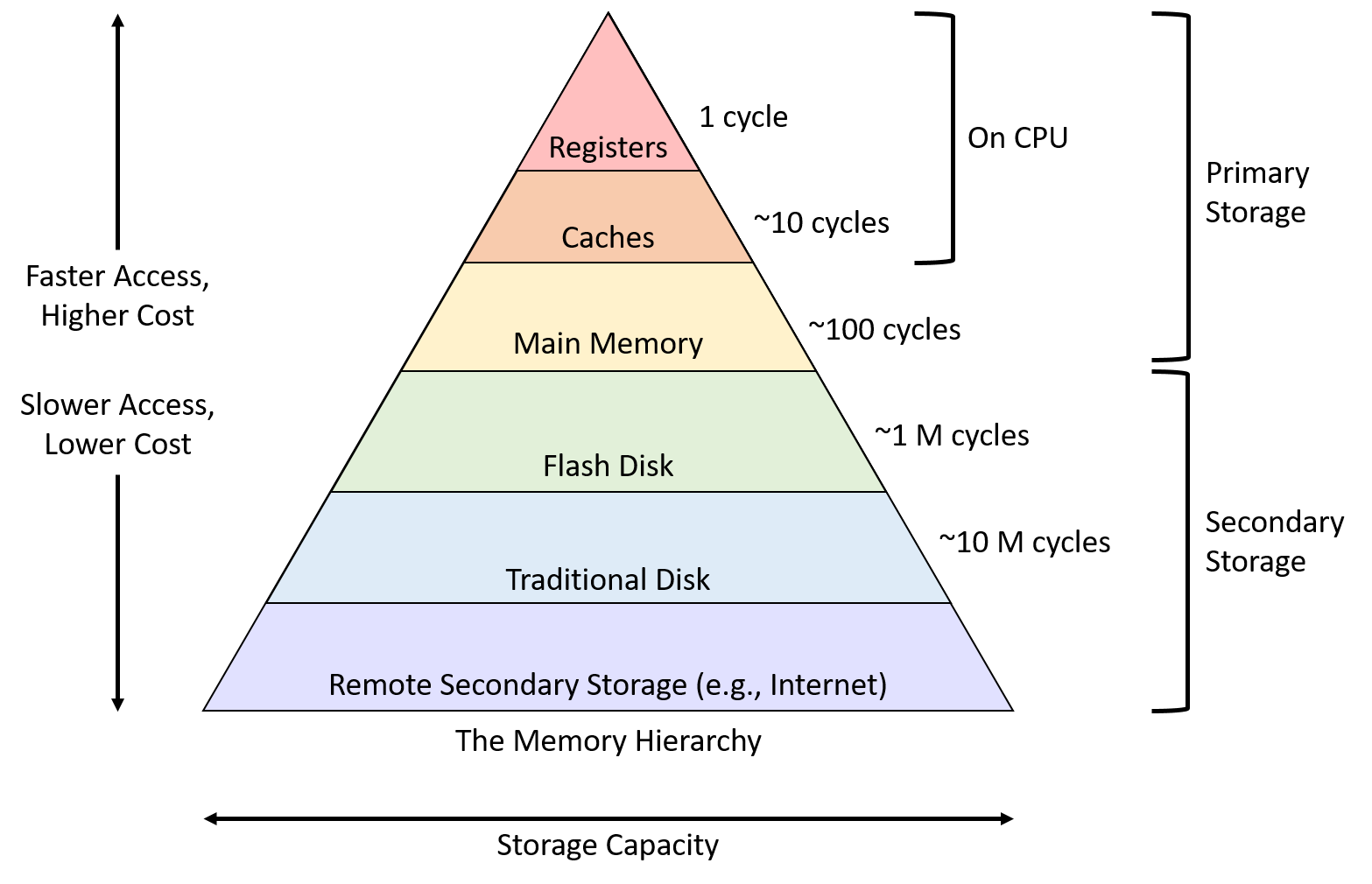
Our journey to understanding memory begins with the Memory Hierarchy. The Memory Hierarchy is a layered structure in computer systems which organizes storage from fastest to slowest forms of memory access (shown below).
For decades, the increase in CPU speed has been much faster than the decrease in access latency for main memory (1). In much older CPU's the access time for memory used to be 1 cycle (since processors were so slow), but now one access to main memory takes 100's of cycles. This is significant because the bottle-neck for system became memory. CPU's could get as fast as they want, but every time they preform access operations it costs them a large amount of cycles. To mitigate this issue Caches were invented.
Caches are temporary, small, pieces of memory, used for fast access times on commonly accessed data.
However, there exists 2 types of short-term memory:
1. Scratchpad Memory: software-managed short term memory
2. Caches: Hardware temporary memory.
An example of a scratchpad memory is a in-memory cache used to store results from network requests (this topic is not important, but I felt like mentioning it for the curiosity of the reader).
Caches are typically split up into 3 to 4 levels. Respectively named as L1, L2, L3, L4 cache where each level is its own cache.
Below is a table representing each level, size, access latency, per core visibility
1. L1: 32KB | 1-4 cycles | private to each core
2. L2: 256KB | 4-10 cycles | private to each core
3. L3: 6MB | 10-40 cycles | shared amongst all cores
4. L4: 128MB | variable | located off chip and shared
In modern CPUs, each core is given a L1 and L2 cache. In harvard architecture there exists 2 L1 caches one for instructions (I-Cache) and data (D-Cache). L3 caches, on the other hand, are shared amongst all the cores in a processor. The L3 core is split into L3 Banks and latency can change depending on how close a core is to the given L3 bank.
L4 caches are not alway present and they live off the processor. They exists as the last temp storage before you hit main memory (eDRAM).
Caches are built off 2 properties: sets and associativity. You can visualize a cache as a 2D table, where the sets are the rows and the columns are associativity. We can then index this cache table and retrieve a cache line.
A cache line is the smallest unit of data, typically 64 bytes on modern CPUs, that the CPU transfers between main memory and the CPU cache. The reason the cache line is the smallest representation of memory is because the cache exploits locality. Locality is the idea that if we access some memory address we are likely to access neighboring addresses (think of iterating a contiguous array). (FYI cache lines are also referred to as cache blocks)
A set is a group of cache lines, and associativity defines how many cache lines can live on a single set. (The number of columns defines the number of ways, for example 4 columns is a 4-way associative cache)
There exists 3 styles of cache designs: Direct Mapped, Fully-Associative, Set-Associative
Direct-Mapped Caches have 1-way associative cache with a lot of sets.
Fully-Associative Caches are N-way associative with 1 set.
Set-Associative Caches are a mix of Direct-Mapped and Fully-Associative. Some amount of sets and some amount associativities.
Memory Hierarchy: a layered structure in computer systems that organizes storage from fastest/smallest (CPU registers, Cache) to slowest/largest (RAM, SSDS, HDDS, tapes). Used to organize data for fast retrieval. more information
Sets
Associativity
Cache Line / Cache Block
Locality
Direct Mapped Cache
Fully-Associative Cache
Set-Associative Cache